Attention Getting Devices Embedded in Scenes

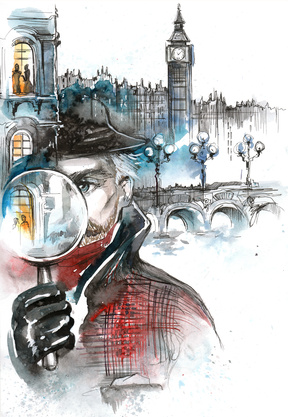
SherlockSpeakers start off their talks with some form of attention getting device. Newspapers use a headline to draw the person to a newsstand in hopes of them picking up a paper. Book authors try to capture the reader with a snappy cover, title and great first paragraph. Movie posters use imagery and star power to attract the passerby. Even movies open with some opening imagery or teaser to pull the audience into the story in the first 2-5 minutes of the film.

Attention Getting Devices are more important today than any other time during our history of communication. With attention spans dropping from 20-30 minutes in the 1960s, to 8-12 minutes in the 80s, to 90 seconds to 2 minutes in the 2000s, it is more important than ever to not only grab the attention of the audience, but to keep it.

Mega box office features use large scale, fast action, and cool visual imagery as attention getting devices. Dramas use a point of fascination within the story coupled with raising a question within the audiences’ mind about how the story will paly out or resolve.

I was chatting with screenwriter Guy Cote last night about how attention getting devices are no longer restricted to just open a film, but are now needed in a more subtle, but still effective form within each scene in a movie. It’s Guy’s view that there has to be something special in every scene that entertains the audience and I agree.

I looked back at the courtroom drama we co-wrote, Tried & True, and realized we did that very thing. Every scene has some form of entertainment in it, which forces the story into a more cinematic mode, compared to the film being limited to a direct to DVD release or television.

The BBC’s Sherlock MOWs are fascinating, as every scene has some entertaining nugget or reveal in it. I’ve watched all 7 episodes and can hardly wait for the 3 that will be released this year. Each 90-minute episode could be successful in theaters and keep the audiences’ attention, but the BBC decided to release it on television – In my opinion, raising the standards of television.

The average number of stars on a 10-point system that critics have assessed the Sherlock shows is a 9.2 over the 7 episodes. This is amazing when you think about maintaining such a high quality of story within 10 stories over 3 years. Its no wonder the series is a huge success internationally – Everyone loves a high quality entertaining story.

Here are some of the attention getting devices that are salted throughout every scene in Sherlock:

Universal Question
A question in the form of a mystery is revealed at the beginning of every episode. This drives the audience to watch the film until they get the question answered. In most episodes the question is associated with a murder that must be solved within a certain time constraint to drive the audiences’ need to know the answer with a sense of urgency. In some scenes additional questions get raised or it’s revealed that the universal question has more parts to it.

Relationship Reveals
The unique relationship between Watson and Sherlock is like an onion that has one layer peeled a way with each story. The characters are both clearly experts in their fields, which generates mutual respect and a sense of friendly unspoken competitiveness. This drives the audience to know more about how and why they get along so well, even when the relationship appears dysfunctional or miraculous – Both very entertaining prospects worth exploring.

Hyper Focus
Sherlock’s level of genius brings boredom into his life all too quickly. He needs extremely difficult puzzles to solve or his insanity rises. This demand on his soul for stimulation drives him to observe the tiniest of details and drives a fascination in the audiences’ mind as they watch genius at work. Everyone loves watching extreme experts do their thing like Michael Jordan playing basketball, Luciano Pavarotti singing lyric opera, and Sherlock solving unsolvable cases.

The above attention getting devices are salted generously throughout each scene. These entertainment moments are embedded organically in each scene making it’s existence mandatory for the progression of the story. In fact, I can’t recall seeing any scene that didn’t have to be in the film. Nor was there any scene that didn’t have something specific for the audience to enjoy or chew on.

The series also used a good deal of humor to help the audience rest just long enough to be refreshed and then reengaged into the mystery. By allowing the audience to get their emotional wind back, they were ready to receive more information and attempt solving the case as junior detectives. Each viewer was bound to walk away from an episode longing to be more like Sherlock, or at least feeling driven to be the best in their field.

Copyright © 2013 by CJ Powers
Illustration © okalinichenko – Fotolia.com

Filmmaking Resources

© Ilyes Laszlo - Fotolia.comI’m often asked for book recommendations and other resources that cover various techniques someone desires to learn. My answer is typically non-specific, as I’ve learned most of my information from pros in the industry. However, I do take time to read books and magazines written by friends and other industry leaders who are known for specific information.

For instance, I’ve had a couple opportunities to work with Dr. Linda Segar who has great insights concerning character development, hero based story structure, and translating a book to the screen. Each of her books has a handful of nuggets that have stayed with me over the years. She also consults for those who like to pick the brains of brilliant people. I believe her biggest selling book is Making A Good Script Great.

Several books from my library on story and screenwriting that have become dog-eared from certain chapters being reread include:

The Coffee Break Screenwriter by Pilar Alesandra
The Story Solution by Eric Edson
Screenwriting 434 by Lew Hunter
Story by Robert McKee

There are a lot of other great books published by Lone Eagle, Focal Press, Michael Wiese Productions and Penguin Books, to name just a few.

For those working with smaller crews, I recommend Craig D. Forrest’s book: Commando Tactics for Digital Filmmakers.

My latest reads and rereads include:

Professional Storyboarding by Sergio Paez & Anson Jew (Note: Excellent book!!!)
On Directing Film by David Mamet
The Film Director Prepares by Myrl A. Schreibman
Directing Film Techniques and Aesthetics by Michael Rabiger

I mix up my reading between books on business, story, creativity, screenwriting, directing, filmmaking, biographies and fiction. I made a commitment to read a minimum of 12 books a year since I joined the entertainment industry. However, that number changed once I learned that a person can become an expert in a few short years by reading every book and article they can find on a given subject. I now read the equivalent of two books a month on average, taking into consideration interview transcripts and trade articles covering industry pros.

Of course, there is one new book coming out in July that is a must read…

Notes from the Napkin: A Director’s Cut on Filmmaking by CJ Powers

Okay, so a little self-promotion isn’t too bad, right?

My new book includes some of the most read articles from CJ’s Corner and other chapters based on questions new and independent filmmakers have asked me or that I’ve asked of the Hollywood pros. Since a lot of my most used knowledge came from 2-5 minutes spent with people like Ron Howard, Christopher Nolan, Wally Pfister and Ken Burns, I thought passing on my notes from the “napkins” I’ve collected over the years would be of help to the reader.

There are film techniques still done the same way as it’s been done since the early 1900’s and other techniques that are developed every year. To stay on top of this information there are numerous trade publications and websites available for gleaning this information. The lists below are just a smattering of what is available.

Screenwriting
Hollywoodlitsales.com
Donedealpro.com
Scriptpipeline.com
Writerstore.com
Script-o-rama.com
Scriptologist.com
Inktip.com
Wordplayer.com
Moviebytes.com

Filmmaking
Filmmaking.com
Filmmakers.com
Filmfestivals.com
Wihtoutabox.com
Insidefilm.com
Zap2it.com
Projectgreenlight.com

Filmmaking Terminology
Filmland.com/glossary/Dictionary.html

Film Buffs
Imdb.com
Moviejuice.com
Aint-it-cool-news.com
Rottentomatoes.com
Filmthreat.com
Filmsite.org

Screenwriting and Filmmaking Magazines
Creative Screenwriting
Screenwriter
Script Magazine
Imsdb
Fade In
Hollywood Scriptwriter
Moviemaker
Screentalk
Film Journal
Filmmaker Magazine

Industry Publications
Hollywood Reporter
Variety
Daily Variety
Back Stage
Premiere
The Independent: Film & Video Monthly
Written By (Writers Guild of America, West)
DGA Quarterly

Shot Designer is FREE – Review

cameradiagram1There are numerous ways to develop blocking diagrams for actor and camera movement. The 3X5 card was the standard for decades, but today Shot Designer by Hollywood Camera Work is quickly moving into the limelight. It’s a tool that many have asked about since my previous blog: Camera Set-Ups and Shot Lists. With all the interest, I decided to review Shot Designer.

The software works on both MAC and PC, as well as iPhone, iPad, and Android. If you’re able to create blocking diagrams one at a time, the software is free on any of the devices. However, once you’ve used it for 30-60 seconds, you’ll want to pay the low price of $19.99 for the professional version that gives you more features and allows you to save your work.

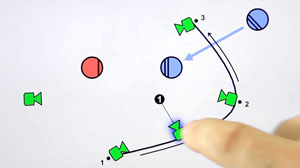
diagram and listI downloaded it to my iPad from the app store and made my first blocking diagram complete with sets, cameras, actors and action props in less than 5 minutes (including download time). My second blocking diagram took me 30 seconds. I experimented with my third diagram by adding in numerous camera positions, actor movements, and lighting changes. After 3 minutes I pushed the animation button and watched everything move at the times and speeds that I had predetermined. This greatly simplifies my explanation of a complex set up to the camera crew.

spreadsheetThe software is very simple to use and gives a clean professional look to your blocking diagram. With the simple click of 3 buttons (Share, Current Scene, and Send) an email is sent that includes a .pdf of the blocking diagram, shot list, and a spreadsheet.

The shot list includes: Shot Number, Version, Nickname, Description, Shot Type, Type Code, Lens, Props, Gear, and Crew. While directors don’t need all of that information the DP will love it. And, the Script Supervisor will also appreciate the information in clean typed lists. The shot list is also output in a .csv file that can be quickly pulled into Excel for alterations or editorial reports.

The software allowed me to import background pictures and blueprints, so I could build the blocking diagram over the actual set plans. This gave the added benefit of designing lighting rigs for the lights that wouldn’t need to be moved.

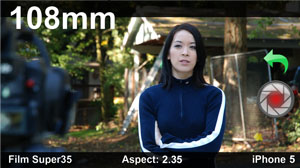
viewfinder1There is an added benefit that allows you to attach storyboards to each camera, which gives the camera department an understanding of what the camera is supposed to see. Additionally, you can attach a director’s viewfinder photo that includes format, aspect ratio, lens and image shot with the mobile device – Making it ideal for location scouts or set walk throughs. The image is captured directly from the camera that is built into your mobile device.

The software was clearly designed for mobile devices and works extremely well on the iPad. At the time of this writing, I hadn’t yet tried the iPhone version, but I did try the MAC version with a touch pad and a Wacom Bamboo pen tablet. Using the pen on the MAC was even more enjoyable and easier than using my finger on the iPad, which was amazing in of itself.

The only issue I had with the MAC version was the lack of keyboard or pen shortcuts. After all, if I had the shortcuts, I could do a diagram in 12 seconds rather than 30. Okay, I know I’m sounding a bit selfish at this point, especially with how easy Shot Designer is to use.

The Shot Designer website has several videos that makes the software simple to understand  before purchase. The company is also very friendly and willing to help their customers, but frankly all the questions I could come up with were already answered on their website. I just contacted them to get a feel for their helpfulness and I was very happy with their responsiveness and friendliness.

Since I’m a part of the generation that likes to keep all my documents on my computer, Shot Designer is ideal for me. I no longer have to draw jittery pictures, scan them, and then email mail them out, as Shot Designer allows me to create clean diagrams on my iPad and send them out with three simple clicks.

Since the software is free, I suggest you download it today and start learning how to create great blocking and camera set up diagrams in an easy and professional manner.

Disclosure of Material Connection: I received one or more of the products or services mentioned above for free in hopes that I would mention it on my blog. Regardless, I only recommend products or services I use personally and believe will be good for my readers. I am disclosing this in accordance with the Federal Trade Commission’s 16 CFR, Part 255: “Guides Concerning the Use of Endorsements and Testimonials in Advertising.”